Call History Page with Live Updates
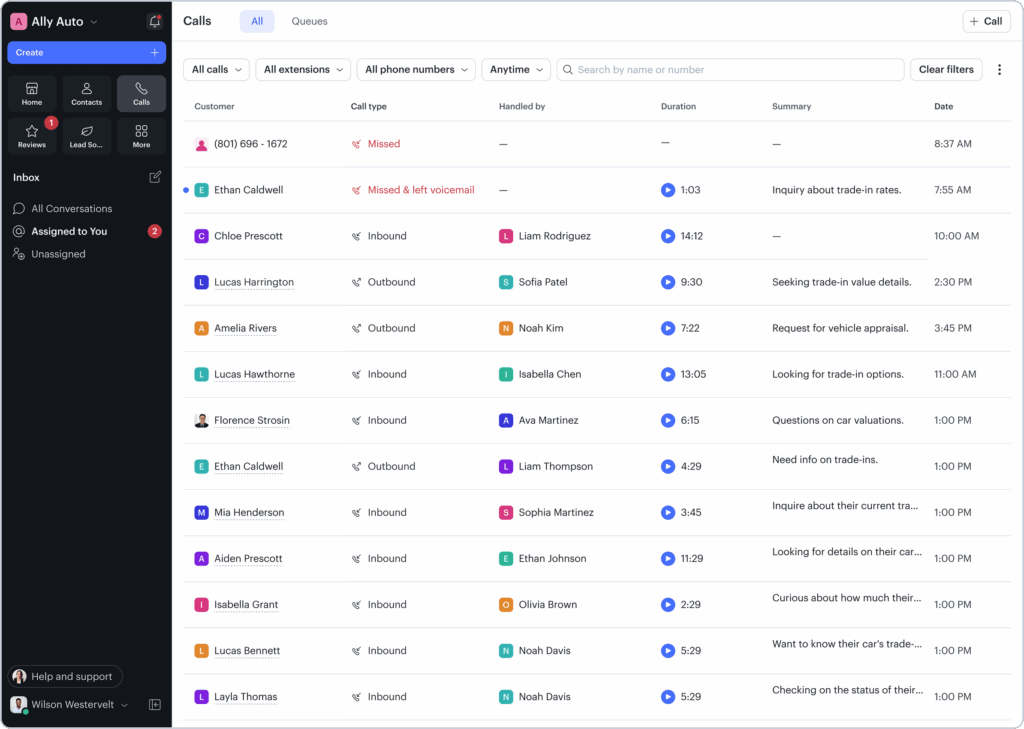
Podium Phones users can now review calls faster with a refreshed Call History page that updates live and surfaces key details at a glance.
What’s new?
Real-time updates
The Call History page now updates in real time, showing calls as they happen without needing to refresh or click “load more.” This includes calls answered by AI, so teams always have a complete and current view of call activity.
Refreshed call history layout
A refreshed Call History layout reduces friction when reviewing calls by making key details easier to scan at a glance—from who called and when, to how the call was handled, routed, and summarized. Infinite scroll and hover states reveal additional metadata as needed for faster call review.
Live call visibility
Podium Phones users can now see calls as they happen in Call History, including calls handled by AI. This gives teams real-time visibility into all call activity at their business, whether a call is answered by a team member or AI.
Available to all businesses with Podium Phones.
Stay on top of AI escalations with clearer visibility and faster follow-up
AI Escalations are now easier to track, prioritize, and resolve—so nothing critical slips through the cracks when your team needs to step in.
What’s new?
Escalation tiers let you notify managers automatically when an escalation hasn’t been resolved within a set amount of time, helping ensure urgent issues get the right attention. Note: only available to businesses using Podium’s next-generation AI (Jerry 2.0).
SMS notifications for escalations provide an additional way to reach your team when issues are high priority. SMS is on by default for escalation tiers and can be managed in notification preferences.
Clear resolution controls add a banner above the message composer whenever an escalation is open, with the ability to mark the escalation as resolved once it’s handled.
Together, these updates make it easier to understand when an escalation needs action, who should be notified, and when it’s been completed.
Only available to businesses using Podium’s next-generation AI (Jerry 2.0).
More professional, on-brand emails with custom signatures and rich text formatting
Send professional emails from your own email domain in Podium, with custom signatures and rich text formatting for a more polished look.
What’s new?
Custom email signatures
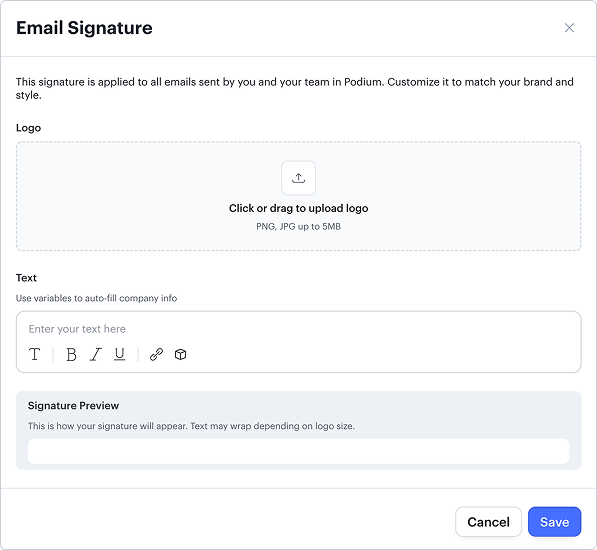
Add a branded signature to all emails sent through Podium. Upload your logo and customize footer text to reflect your business and brand. Signatures support dynamic variables, so details like your business address or contact information stay up to date automatically. Once configured, the signature is applied to every outgoing Podium email.
You can set this up in Settings → Lead Sources → Emails.
Rich text formatting for emails
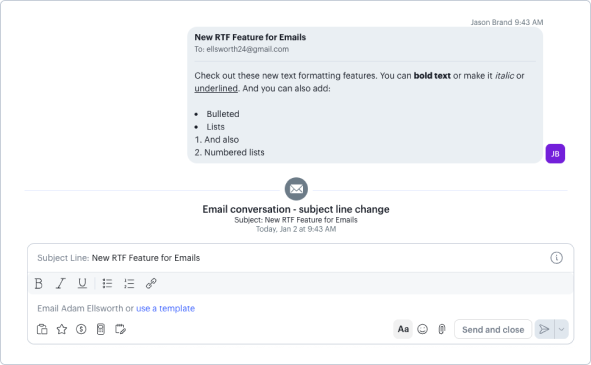
Format email messages as you compose them in Podium using the formatting toolbar (click the “Aa” icon). With this update, you can bold, italicize, and underline text, and create bulleted and numbered lists to improve readability and keep important information from getting missed.
Available to all businesses using Podium.
Fewer AI Interruptions on Voice AI Phone Calls
Voice AI conversations now feel more natural with smarter response timing.
What’s new?
Dynamic interruption handling
Podium Voice AI now adjusts its response timing based on how quickly someone is speaking. Slower speakers are given more room to finish their thoughts, while faster speakers still get quick, responsive replies.
This update reduces accidental AI interruptions by nearly 50 percent, helping phone conversations flow more naturally and improving overall call quality.
Available to all businesses with Podium Voice AI.
Route After Hours Calls to Call Queues
Reduce missed after-hours calls with queue-based routing.
What’s new?
After-hours queue routing
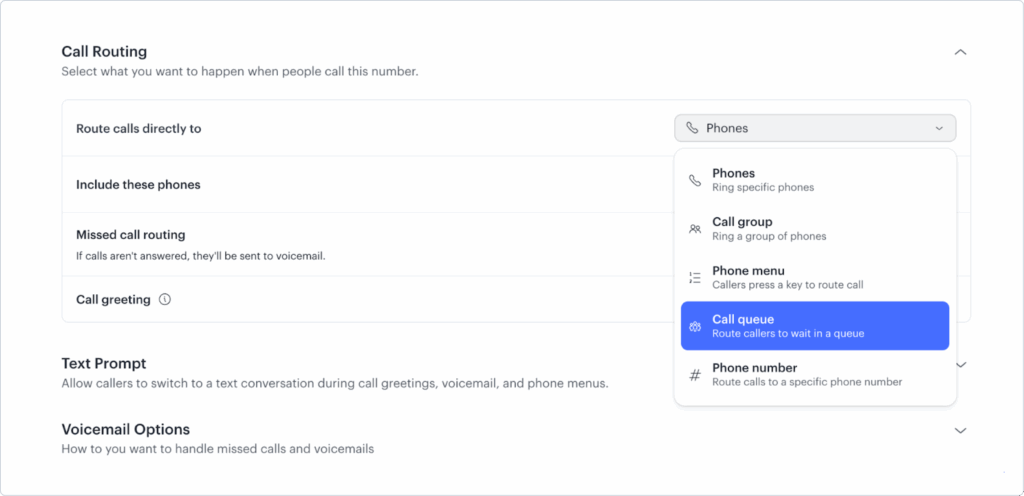
Call queues can now be selected as an after-hours routing option in Phone Settings. Previously, queues were only reachable during business hours.
This update makes it easier to use queues for on-call coverage or other after-hours workflows, helping teams share responsibility and avoid missed calls outside of normal business hours.
Available to all businesses with Podium Phones.
Collect Card on File via SMS
Collect a customer’s credit card on file securely without asking for payment details over the phone.
What’s new?
SMS card-on-file collection
Now you send an SMS with a secure link to collect and a customer’s card on file. This makes it easier to charge for things like appointment no-shows, delayed payments, or recurring memberships.
You can also use the Payment Method Setup Link inbox variable to send custom messages or create templates for repeat use.
This provides a more secure and efficient alternative to collecting card details over the phone, without requiring customers to share payment information verbally.
Available to all businesses.
Collect Terms of Service Consent on Payments
Share your terms of service with customers and collect consent at the time of payment.
What’s new?
Terms of service consent for payments
Businesses can now add their terms of service in Podium and generate a hosted link that can be shared both inside and outside of Podium.
Text-to-Pay payments can now include an optional terms of service consent step before payment is completed—helping reduce disputes and align expectations.
Available to all businesses.
Issue Digital Gift Cards with Podium Payments (MedSpa)
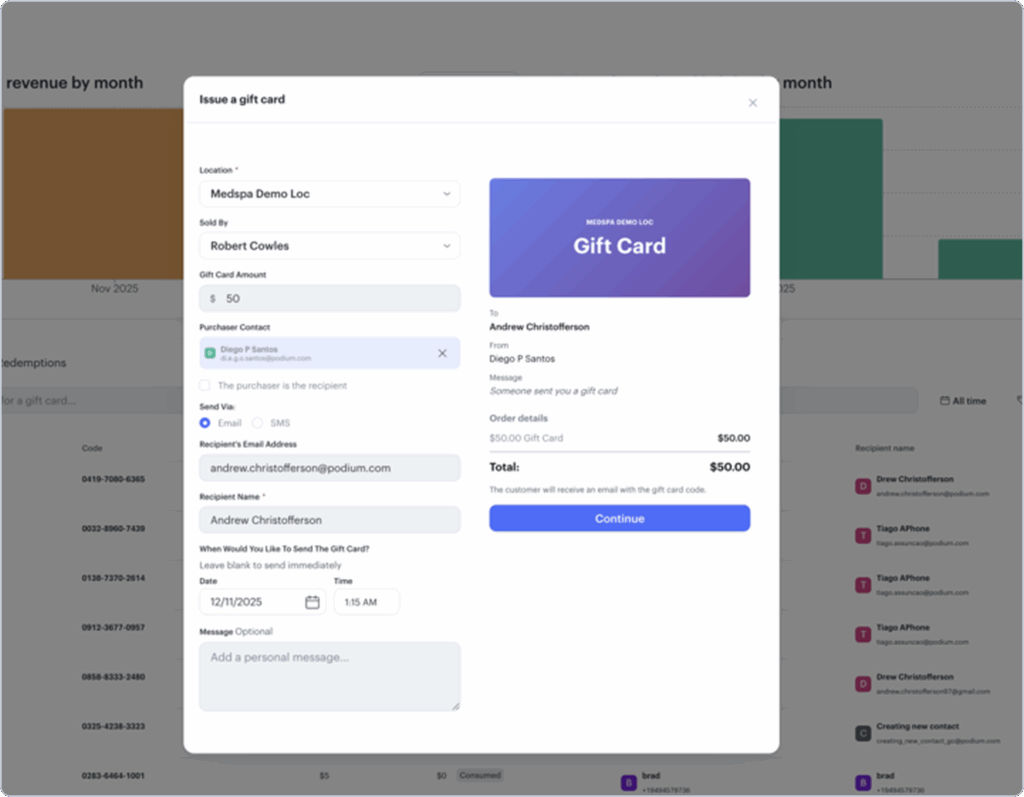
MedSpas using Podium’s AI Operating System can now offer digital gift cards through Podium Payments.
What’s new?
Sell and redeem digital gift cards through Podium
MedSpa businesses can now sell, track, and redeem digital gift cards for a single location during checkout through Podium Payments.
Track gift card revenue and balances
MedSpa businesses can view gift card revenue by month and track remaining gift card balances, so you always know how much value is outstanding across issued gift cards.
Export gift card sales and activity
Businesses can export gift card data—including sold date, original value, current balance, redemptions, and fees—to support reporting, reconciliation, and record keeping.
This new feature gives MedSpa businesses a simple way to attract new customers, collect prepaid revenue, and manage gift card programs digitally in one place.
Available to all MedSpa businesses with Podium Payments and AI OS enabled.
Apply Line-Level Price Adjustments (MedSpa)
Adjust pricing for individual invoice items at checkout.
What’s new?
Line-level discounts and price overrides
MedSpa businesses using Podium’s AI Operating System can now adjust pricing for individual invoice items at checkout. Teams can apply percentage adjustments, dollar amount adjustments, or override the price entirely for a specific line item, with totals automatically recalculated.
This makes it easier to handle flexible pricing scenarios and make quick adjustments during checkout without modifying the entire invoice.
Available to all MedSpa businesses using Podium’s AI Operating System.
Call Routing to Rotations (Home Services)
Home Services teams can now route incoming calls to a rotation, ensuring calls always reach the correct on-call team member as schedules change.

What’s new?
Route calls to a rotation
Instead of routing calls to an individual user, you can now route calls directly to a rotation. Calls are automatically delivered to the correct person based on your rotation schedule.
Dynamic routing as schedules change
As your on-call schedule updates, call routing stays in sync—no manual changes required. This helps ensure calls are handled correctly, even as coverage rotates.
Fewer missed or misrouted calls
By keeping call routing aligned with your rotation, teams can reduce missed calls and avoid routing issues, especially during after-hours or on-call coverage.
Available to select Home Service businesses with Podium Phones. Reach out to your Customer Service Manager for additional details.
More Relevant Jerry Responses from Lead Form Comments (Auto)
Jerry now uses customer questions from lead forms to tailor responses.
What’s new?
Jerry uses lead form comments in first responses
For dealerships using CDK CRM, Jerry can now generate responses based on comments provided by customers when they submit a lead form. If a customer includes a question or note with their lead, Jerry uses that context to respond directly in the first message.
This helps ensure responses are more relevant, answer customer questions up front, and avoid generic replies that miss important details.
Available to Auto dealerships using Jerry 2.0 and CDK CRM.